🔗 How Does React Communicate with Backend APIs?
The frontend displays products, but the actual product data is stored in a database.
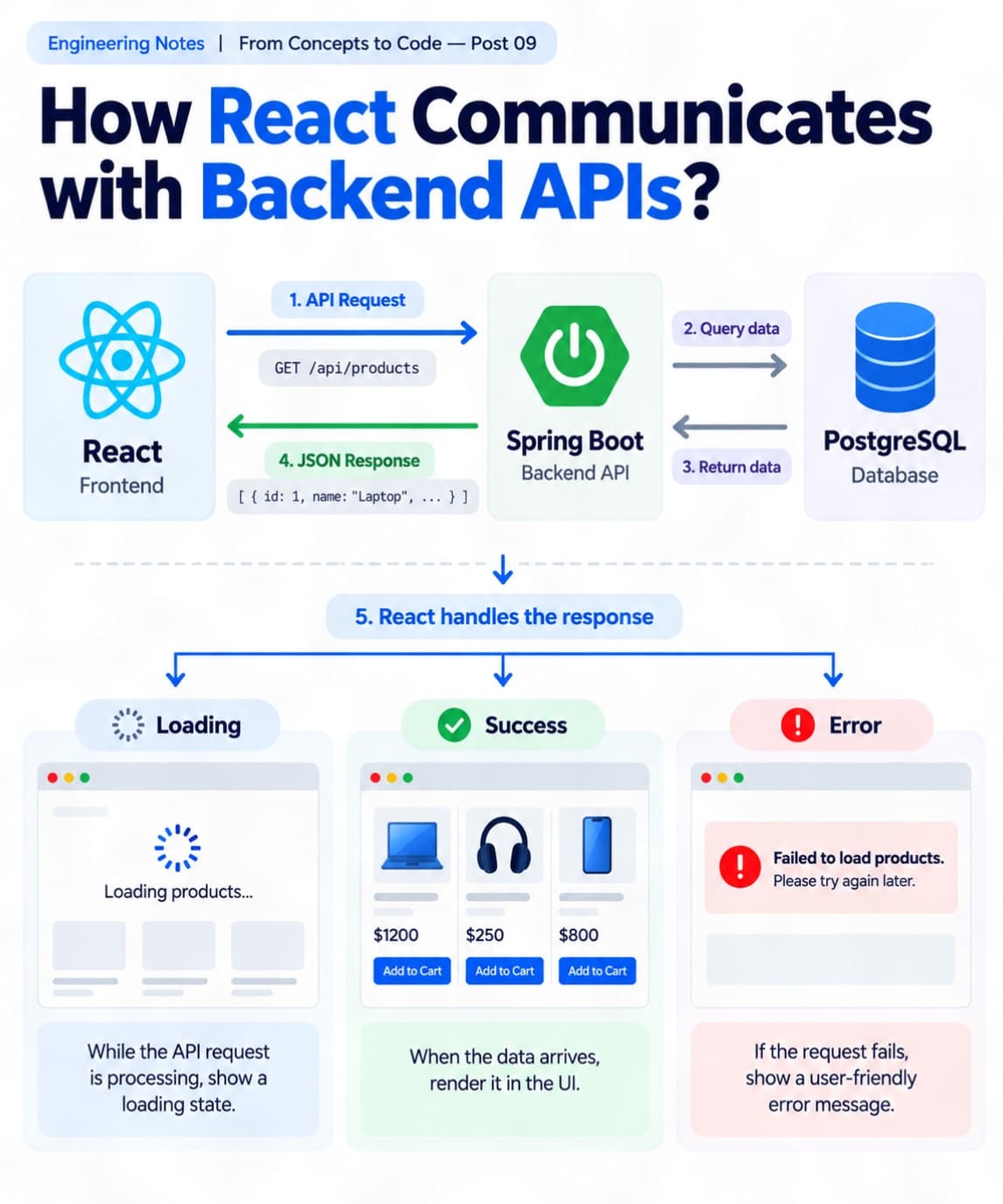
ᅠ 📘 Engineering Notes | From Concepts to Code — Post 09 ᅠ Imagine building an e-commerce application using React and Spring Boot.
The frontend displays products, but the actual product data is stored in a database.
How does React get that data? 🤔
That's where REST API integration comes in!
Let's break it down. 👇 ᅠ 1️⃣ Sending API Requests 🌐
React can communicate with backend APIs using fetch() or Axios.
Example:
const response = await fetch('/api/products'); const products = await response.json();
Here, React sends a GET request to retrieve product data.
The backend processes the request and returns a JSON response. ᅠ 2️⃣ Using Async / Await ⏳
API requests take time to complete.
Async/await helps us handle asynchronous operations using readable code.
While waiting for the response, React can continue displaying the interface.
When the data arrives, we update the component state. ᅠ 3️⃣ Managing Loading States 🔄
What happens while the API request is processing?
Instead of showing an empty screen, we can display:
⏳ Loading products...
Example:
const [loading, setLoading] = useState(true);
After the request finishes, we set loading to false.
This improves the user experience. ᅠ 4️⃣ Handling API Errors ⚠️
API requests can fail because of network issues, server errors, or invalid responses.
We should handle these situations gracefully.
Example:
try { const res = await fetch('/api/products');
if (!res.ok) { throw new Error('Failed to fetch'); }
const data = await res.json(); setProducts(data); } catch (error) { setError('Unable to load products'); } finally { setLoading(false); }
This prevents users from being left with an unexplained empty screen. ᅠ 5️⃣ Rendering API Data 📦
Once the data is available, React can render it dynamically.
Example:
products.map(product => ( \<ProductCard  key={product.id}  product={product} /> ));
One reusable component can display many products. ᅠ 💡 My Key Takeaway
API integration isn't just about fetching data.
It's about managing the complete request lifecycle:
✅ Loading ✅ Success ✅ Error
Handling these states properly helps us build reliable, responsive, and user-friendly applications. ᅠ 💬 How do you usually handle API requests in React fetch, Axios, or TanStack Query? ᅠ #ReactJS #SoftwareEngineering #RESTAPI #FrontendDevelopment #FullStackDevelopment